

Every data centre on your shortlist seems to promise the same things: Tier III infrastructure, 99.99% uptime, security certifications and carrier-neutral connectivity. Knowing how to choose a data centre starts with the evidence behind those claims. Check which Uptime Institute certification stage supports the Tier rating, what the incident history shows and whether the ISO/IEC 27001 certificate covers the facility you will use. Then find out how SLA uptime is measured, what happens when the provider misses it and how much power per rack the site can supply and cool. These checks give you a basis for comparing providers before discussing prices or signing a contract.
Data centre selection criteria: what to check first
Ask every provider for the same evidence across these six areas:
- Security and certification scope: Request the access-control procedures and current certificates or audit reports. Check that they cover the legal entity, location and services in your proposal.
- Tier certification and redundancy: Ask which certification stage supports the Tier claim, then verify the facility in Uptime Institute’s public directory. Request incident records, maintenance procedures and recent infrastructure test results.
- Connectivity: Obtain the list of carriers physically present, evidence of separate fibre routes, and cross-connect installation times and charges. Several carrier names do not prove route diversity.
- SLA and service credits: Read the availability calculation, exclusions, support commitments and credit schedule. Establish what counts as an interruption and how you submit a claim.
- Power and growth: Request the supported power and cooling capacity for your proposed racks, together with written terms for reserving additional capacity.
- Cost and contract: Obtain an itemised quotation covering installation, recurring services, additional work and exit costs. Check renewal dates, price increases and termination notice periods.
Record the evidence against the exact site and service being offered. A certificate or capability available elsewhere in the provider’s portfolio does not establish what your chosen facility delivers.
Define your requirements before you compare data centres
Before meeting providers, work out how much rack space your equipment needs and how much power each rack will draw, measured in kW per rack. The facility must supply that load and remove the resulting heat.
Location affects application latency and your team’s access to equipment. For a backup site, assess whether floods, storms or electricity infrastructure could disrupt both locations. A recovery site protects you only if it does not share those flood, storm or electricity risks with the primary site.
Document these five requirements:
- Equipment: Rack units, dimensions, weight, power connections and measured or specified consumption per device.
- Compliance: Applicable PCI DSS or HIPAA obligations, contractual data-location requirements and GDPR transfer safeguards. GDPR does not impose a blanket requirement to keep all personal data inside the EU.
- Recovery: Recovery time objective (RTO), the target restoration time, and recovery point objective (RPO), the acceptable amount of data loss expressed in time.
- Growth: Expected space, power and cooling needs over 24 to 36 months, including planned GPU or AI servers.
- Location and access: Required network latency, travel time for engineers and evidence that primary and recovery sites avoid common hazards.
Physical security controls to check on a site visit
A data centre should control and record who enters the building, reaches the data hall and accesses your equipment. During a site visit, ask staff to demonstrate the normal visitor journey and explain how exceptions are handled.
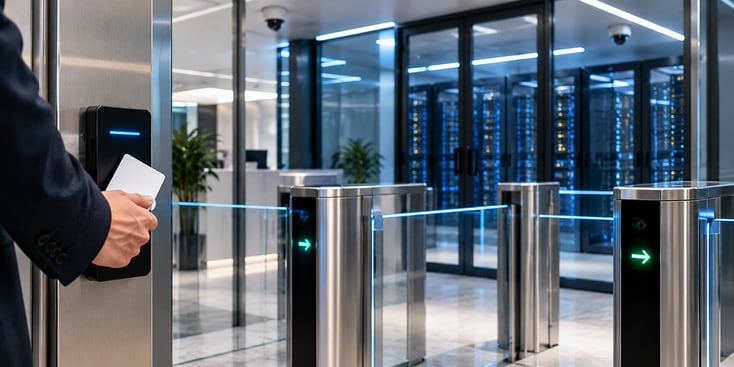
- Controlled entrance: Check that visitors use a designated entry point, present identification and receive authorisation before entering.
- Multi-factor access: Look for a card combined with a PIN or biometric check at appropriate access boundaries.
- Anti-tailgating controls: Inspect the mantrap or equivalent arrangement that prevents an unauthorised person following someone through.
- On-site security staff: Confirm continuous guard coverage and who responds to an alarm outside business hours.
- CCTV and access logs: Request retention periods and the procedure for obtaining records relevant to your equipment or an incident.
- Rack or cage locks: Verify how access is restricted, approved, recorded and revoked.
Red flag: The provider refuses a controlled visit or cannot explain how access records are retained and made available.
Which certifications should a data centre have?
Ask for the provider’s ISO/IEC 27001 certificate to check which operations its information security management system covers. If the provider also has a SOC 2 Type II report, request it to see how an independent auditor assessed the effectiveness of its controls over the audit period.
- Scope: Read the certificate’s scope, including the legal entity, covered services and listed locations. Match these to the facility and service in your quotation. Check the system boundaries in the SOC 2 report too.
- Validity: Check certificate dates, current status and the issuing certification body’s accreditation. IAF CertSearch provides verification of accredited certificates, including their scope and certified locations. Resolve any discrepancy with the issuer.
- Report type: Request the SOC 2 Type II report, its audit period, the auditor’s opinion and any exceptions. A Type I report assesses controls at a specific date, so it provides different evidence. Sector-specific requirements apply where your data and activities require them.
Red flag: Certification logos appear on the website, but the underlying documents remain unavailable even under an appropriate confidentiality agreement.
Tier ratings and redundancy: how much resilience you need
Tier III is a practical starting point for many business workloads that need maintenance without shutting down IT equipment. Evaluate Tier IV when the requirement also includes continued operation through a single infrastructure failure. If you are a European buyer, you will also encounter EN 50600, which uses four availability classes for supporting infrastructure, including power, cooling and telecommunications cabling.
According to Uptime Institute’s Annual Outage Analysis 2026, power is the leading cause of impactful outages, with UPS, transfer-switch and generator failures prominent. The same analysis reports that 57% of respondents to Uptime Institute’s 2025 survey put the cost of their most recent major outage above $100,000. That is why you should request the facility’s incident history, root-cause findings and evidence that corrective work was completed.
What does Tier III mean in a data centre?
Uptime Institute’s classification progresses from basic infrastructure to fault-tolerant infrastructure. Tier I provides basic capacity, while Tier II adds spare capacity components, but maintenance still requires shutdowns. At Tier III, the site becomes concurrently maintainable: each capacity component and distribution path can be taken out of service for planned maintenance or replacement without interrupting IT operations. This addresses the practical need to service electrical and cooling infrastructure while equipment keeps running.
Tier IV adds fault tolerance: IT operations continue if an individual component fails or a distribution path is interrupted, whereas at Tier III a single equipment failure or path interruption can still stop IT operations. When comparing the two, remember that neither classification sets your contractual uptime percentage or guarantees that your applications will remain available.
Use the Tier assessment to evaluate facility infrastructure, then assess the SLA, operational practices and your own application recovery arrangements separately. If the only working copy of an application is on a server that fails, the Tier rating of the building will not keep that application running.
How do you verify a data centre’s Tier certification?
Ask which Uptime Institute certification stage supports the claim, request the certificate and match the facility against the public list of issued certifications. Check the site name, covered phase, award type and Tier level, and ask for the award date: design awards expire after two years, and operational awards after one to three years.
| Certification stage | What it demonstrates | What to request |
|---|---|---|
| Tier Certification of Design Documents (TCDD) | The documented design meets the intended Tier requirements | Design certificate and covered project |
| Tier Certification of Constructed Facility (TCCF) | The completed infrastructure has been verified and tested against the Tier requirements | Constructed-facility certificate and scope |
| Tier Certification of Operational Sustainability (TCOS) | Operating practices have been assessed against the site’s Tier objectives | Operational award, level and validity |
A design award alone does not establish that the completed facility passed construction testing. The operational assessment adds evidence about how the site is managed.
TIA-942 is a separate Telecommunications Industry Association standard with four rating levels. Its Rated-3 designation and Uptime’s Tier III belong to different certification schemes. Record which of the two schemes the provider’s certificate belongs to.
Red flag: “Built to Tier III standards” or “Tier III compliant” appears without a named certification and supporting document.
What is N+1 vs 2N redundancy?
If a load requires two UPS units, N+1 adds a third as a spare. A 2N arrangement provides two independent systems, each capable of carrying the full load. With 2(N+1), each independent system also has a spare unit. Check the complete distribution paths alongside these component counts.
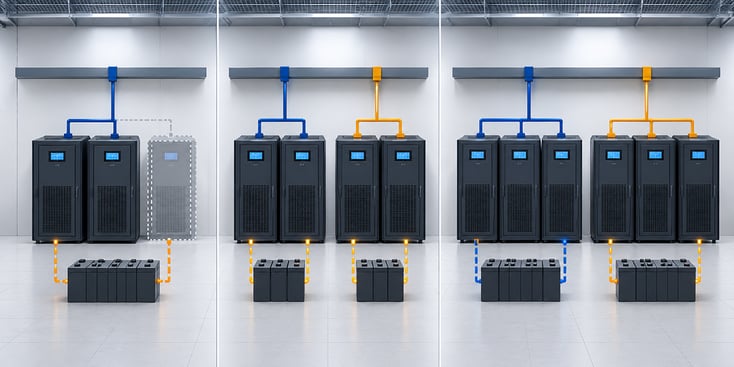
Ask the provider:
- What is the UPS configuration and battery runtime at full supported load?
- How many hours will generators run, and what fuel-replenishment agreement supports them?
- What cooling capacity remains during a failure or maintenance?
- How often are generators and transfer switches tested under load?
- Which written maintenance and emergency procedures govern the work?
Uptime’s 2025 outage analysis found that nearly 40% of organisations had experienced a major human-error-related outage in three years. Of those incidents, 85% involved procedures being ignored or being inadequate. Request test records and evidence of staff training alongside the diagrams.
How to check a data centre’s connectivity
When comparing connectivity options, ask which networks you can connect to and how those connections reach your equipment. Within the facility, your rack connects to a carrier, a cloud on-ramp or another customer’s equipment through a physical cable known as a cross-connect.
To assess the available connections and identify any shared points of failure, ask the provider these questions:
- Which carriers are physically present? Request their names and available services, then count viable options.
- How many separate fibre entrances exist? Ask for route evidence showing whether connections share ducts or entry points.
- What does a cross-connect involve? Obtain installation lead times, setup fees and monthly charges.
- Where are the cloud on-ramps? Establish whether connections to AWS, Azure or Google Cloud are available on site or require an additional network leg.
- Which internet exchange points are accessible? Confirm the route, service and commercial arrangement for reaching each IXP.
Red flag: Only one carrier is available, or supposedly diverse services enter through the same vulnerable route.
What does carrier-neutral mean?
A carrier-neutral facility lets you buy connectivity from any carrier present in the building. You gain a choice of suppliers and the opportunity to change carrier while leaving your equipment in place. This helps when comparing prices, negotiating contracts or selecting a network that serves your destinations.
Resilience also depends on the paths those carriers use, since two suppliers sharing the same external duct remain exposed to one excavation incident. Uptime’s 2026 outage analysis reports that publicly documented fibre and connectivity outages are increasing and are more likely to cause extended disruption. Ask providers to demonstrate carrier diversity and physical route diversity separately, including any shared sections beyond the building entrance.
SLA terms: uptime, exclusions and support response
Expect a written availability percentage for each service you buy, such as 99.99%, and a defined method for measuring it; the table below converts common percentages into maximum downtime.
| Guaranteed availability | Maximum downtime per year | Maximum downtime per 30-day month |
|---|---|---|
| 99.9% | 8.76 hours | 43.2 minutes |
| 99.95% | 4.38 hours | 21.6 minutes |
| 99.99% | 52.56 minutes | 4.32 minutes |
| 99.999% | 5.256 minutes | 0.432 minutes (about 26 seconds) |
Calculated using 525,600 minutes in a 365-day year and 43,200 minutes in a 30-day month, before contractual exclusions.
Then read how the agreement defines these four terms:
- Measurement window: Monthly measurement prevents a provider averaging one lengthy interruption across an entire year.
- Service boundary: Establish whether availability covers power at the rack, network connectivity or both, and what starts the downtime clock.
- Exclusions: Review planned maintenance, force majeure and customer-caused incidents, including notice requirements.
- Support: Separate acknowledgement, attendance and resolution commitments. Remote hands covers physical tasks performed on your equipment by the provider’s technicians, generally charged per task or hour.
Red flag: Broad exclusions or an undefined measurement method make the headline percentage difficult to enforce.
What happens if a data centre misses its SLA?
The contractual remedy commonly takes the form of a service credit, a reduction applied to a service invoice after an eligible breach. Treat this separately from compensation for lost revenue, interrupted operations or other business losses. Credit arrangements often include a cap, a claim deadline and evidence requirements. Read the applicable agreement to establish whether credits are automatic or require a request, which charges are eligible and whether the credit is the sole contractual remedy.
Ask these questions before you sign:
- What credit applies at each breach threshold? Request the schedule and an example showing how it applies to your contracted services.
- What is the cap? Establish whether it applies per incident, per service or per billing period.
- How do we claim? Obtain the deadline, submission process and required incident evidence.
- What happens after repeated breaches? Check whether persistent failures create termination rights and which conditions must be met.
Keep the approved SLA with the service order so your operations and procurement teams work from the same terms.
Power per rack and room to grow
Size rack power from equipment demand under load, with capacity for planned growth and cooling to match. In Uptime Institute’s 2025 survey, the average of respondents’ most common rack densities approached 9 kW, up from 8.3 kW in 2024. More than 80% reported no racks above 30 kW, while around one in eight facilities had some racks between 30 and 59 kW. GPU and AI deployments therefore need site-specific checks.
Uptime Institute’s 2025 survey recorded a weighted average power usage effectiveness (PUE) of 1.54, meaning that facilities used 1.54 units of energy in total for every unit consumed by IT equipment. The theoretical minimum is 1.0, so ask the provider how the energy used for cooling and other supporting systems is reflected in your bill. The US Department of Energy describes data centres as using 10 to 50 times the energy per floor area of typical offices, which helps explain why power is a major pricing component.
Before committing to a contract, ask the provider how it will meet your current and future needs, and how those choices affect your costs:
- What load can you supply and cool at our proposed racks today?
- What additional capacity can you reserve, for how long and at what cost?
- What changes would higher-density equipment require, including liquid cooling where applicable?
Hidden costs in a data centre contract
Additional power, cross-connects, bandwidth, engineering work and exit charges often explain the difference between a headline rack price and the full contract cost. Request an itemised quotation based on your planned deployment and a defined growth scenario. Compare the same scope across providers.
Ask for these six cost lines:
- Power: Committed capacity, metered consumption where applicable, overage charges and any cooling or efficiency multiplier.
- Cross-connects: Installation, recurring fees, changes and removal charges for each connection.
- Bandwidth: Included capacity or traffic, billing method, additional usage and any minimum commitment.
- Remote hands: Hourly or task rates, minimum billing increments, out-of-hours premiums and included allowances.
- Installation: Rack preparation, cabling, equipment handling and other one-off work required before service begins.
- Exit and migration: Equipment removal, deinstallation, migration assistance and charges for ending services.
Read the initial term, renewal mechanism, notice period and price-adjustment clauses together. Check when billing begins, whether unused committed capacity remains payable and how adding racks affects the contract end date. Ask the provider to explain any price increase tied to electricity costs or an index.
You should also establish who owns the facility, who operates it and which legal entity signs your agreement. If you contract through a reseller, document who authorises access, handles incidents and owes the SLA remedy. Review the counterparty’s financial position and ownership structure, then ask what happens to your services if the operating arrangement changes.
A weighted scorecard for comparing data centre providers
Score each provider from 1 to 5 against documented evidence, then apply weights that reflect your organisation’s priorities. The suggested weights below are a starting point for procurement and are not an industry standard.
Agree the scoring scale before reviewing proposals: use 1 for missing evidence, 2 for evidence with material omissions, 3 for meeting the requirement, 4 for useful additional capability and 5 for a demonstrable advantage relevant to your deployment. An unanswered document request receives 1 until the evidence arrives.
| Area | Suggested weight | Evidence to request | Score, 1 to 5 | Weighted score |
|---|---|---|---|---|
| Redundancy | 25% | Tier documents, test records, incident history | ||
| SLA | 20% | Measurement rules, exclusions, credit schedule | ||
| Security | 20% | Certificate scope, audit report, access procedures | ||
| Connectivity | 15% | Carrier list, route evidence, cross-connect terms | ||
| Power and growth | 10% | Cooling limits and reserved capacity | ||
| Cost and contract | 10% | Itemised quote, renewal and exit terms | ||
| Total | 100% | Out of 5 |
Multiply each score by its percentage weight and add the results for a total out of 5. For example, a redundancy score of 4 contributes 1.00 to the total.
Keep mandatory requirements as pass-or-fail checks: a strong price score cannot compensate for an unmet legal or recovery requirement. Shortlist two qualifying providers and request references from customers with similar deployment sizes. Ask those customers about incident communication, billing and expansion, so you can collect any evidence still missing before contracting.
Questions to ask a data centre provider
Security
- Which certificate scope and audit report cover our proposed facility and services?
- What are your access-log retention period and documented process for releasing incident records?
Redundancy
- Which Uptime certification stage supports your Tier claim, and where is the award listed?
- What do your incident history, UPS runtime, generator fuel arrangements and latest load-test records show?
Connectivity
- Which carriers are present on site, and what route documentation demonstrates separate fibre entrances?
- What are the cross-connect charges, delivery times and available cloud and IXP connections?
SLA
- What availability formula, measurement window, exclusions and support response times apply?
- What credit applies per breach band, what is the cap, and when must we claim?
Power
- What sustained kW per rack can you supply and cool for our equipment?
- What additional rack, power and cooling capacity will you reserve in writing?
Cost and contract
- Can you provide all installation, recurring, overage, remote-hands and exit charges?
- Which entity owns and operates the site, and what renewal, price-increase and termination clauses apply?
Conclusion
A useful data centre comparison connects each requirement to evidence from the proposed facility: certification documents, operating records, network routes, capacity commitments and contract terms. Use the same scorecard for every provider, investigate missing evidence and confirm that the final agreement reflects what was demonstrated during evaluation. To include M247 Global in that process, see how its colocation facilities are run and request the site-specific documentation, capacity proposal and contractual terms needed to complete your assessment.