

Your website is ready for Black Friday when it handles peak traffic, keeps checkout working and has protections in place against attacks. If something fails, your team needs a tested way to restore the site and resume taking orders. Black Friday falls on Friday, 27 November 2026, followed by Cyber Monday on Monday, 30 November. Adobe forecasts that US shoppers will spend $12.9 billion online on Black Friday, up 9.2% from 2025, and $15.1 billion on Cyber Monday.
To plan for your own store, look at when orders peaked last year, how shoppers moved through the site and which parts of checkout slowed down. Then test whether this year’s setup holds up under similar conditions and beyond. The technical work starts with hosting capacity and a complete purchase test, then moves to attack protection, recovery and the decisions your team will need to make during an incident. Black Friday is also a chance to see how your store holds up before the Christmas campaigns. Use the same checklist for both: test your hosting capacity and checkout, check your defences against attacks and rehearse how you’ll get the store back online if it goes down.
Black Friday ecommerce checklist: what to fix first
Work through these six priorities in the weeks before the sale, leaving enough time to fix problems and check the fixes under load.
Offers, promotional landing page content and campaign emails belong in the marketing plan, while these checks cover the systems that let shoppers browse, pay and receive an order confirmation.
How much traffic can your hosting handle on Black Friday?
Your store’s traffic limit is set by whichever component reaches capacity first. The web server might run out of CPU or memory, the database might exhaust its connections, or the network might reach its bandwidth limit. A third-party script that stalls during checkout introduces another bottleneck, even when your servers have capacity to spare. A load test that follows the shopping journey can show which part of your setup reaches its limit first under the conditions you test.
Ask your hosting provider:
If you expect a surge at a known time, arrange extra capacity beforehand, either by moving to a larger server or adding servers that share the load. Automatic scaling is useful when demand is harder to predict, provided your application supports it, new instances start quickly enough and the database handles the additional connections. M247 Global’s cloud hosting and dedicated servers are two options to assess against those needs. Confirm what your proposed setup supports before you rely on scaling during the sale.
Cache public content that shoppers see in common, and keep cart and checkout pages out of the cache. A content delivery network (CDN) serves copies of static files such as images and stylesheets from servers closer to visitors, reducing the work your origin server has to do. Check the experience in the browser too: Google’s Core Web Vitals targets are Largest Contentful Paint (LCP) within 2.5 seconds, Interaction to Next Paint (INP) below 200 milliseconds and Cumulative Layout Shift (CLS) below 0.1. These measure loading, responsiveness and visual stability respectively.
How to load test your website before Black Friday
How to test your checkout before Black Friday
Start on a phone, as Adobe reported that mobile devices accounted for 57.5% of US online spending on Cyber Monday 2025 and forecasts a 63% share on Thanksgiving 2026. Once you have checked the mobile journey, repeat it on desktop and place a complete test order with every payment method your store offers. Include guest checkout so you know that a new customer can buy without setting up an account.
Set up a second payment processor to take over if the first becomes unavailable, and test the switch before Black Friday. Agree how to check the status of a timed-out payment before sending another attempt to the backup processor. Otherwise, a payment that succeeded without returning a confirmation could be charged twice.
Black Friday security: DDoS attacks, bad bots and payment scripts
A DDoS attack floods your site with traffic from many machines at once and can take it offline, so arrange for attack traffic to be filtered before it reaches your servers. Bots use checkout to test stolen cards or crawl product pages to copy prices, making it worth checking that your bot rules target abusive requests without blocking shoppers. Malicious scripts on the payment page steal card details, so review which scripts are allowed to run and monitor the page for unauthorised changes.
Under PCI DSS guidance on SAQ A, merchants using the questionnaire with an embedded payment form must confirm that their site is protected against script attacks, for example by using techniques described in requirements 6.4.3 and 11.6.1. Check with your payment processor which protections the integration provides and what you need to configure on your side.
How to protect your website from DDoS attacks during Black Friday
Cloudflare reported mitigating 47.1 million DDoS attacks worldwide across industries in 2025, up 121% from 2024, or about 5,376 attacks an hour. The number of very large attacks it observed rose 40% in the fourth quarter compared with the third. Always-on protection filters traffic continuously, whereas on-demand mitigation starts after an attack is detected. During a short sale, the delay before mitigation begins eats into the time shoppers have to buy, so arrange always-on filtering ahead of the event. M247 Global’s network-level protection is one option to discuss with your hosting team.
How to block card-testing bots at checkout
Fraudsters use card testing to find out which stolen card numbers still work by submitting payment attempts through an online checkout. Bots automate those attempts, so a burst of failed payments might be an attack even while the rest of the store appears to be working. Here’s what you can do:
Also, your payment processor’s fraud checks add a second layer when an attempt gets through the website controls.
Backup and recovery plan before Black Friday
Business continuity covers how the store keeps selling and serving customers while part of its setup is disrupted. For example, a second processor might keep payments available while the primary one is down. Disaster recovery covers how the team restores IT systems and data after an outage. For a store, that includes bringing the application back and checking that orders, stock and payment records agree.
| Term | What it means for an online store |
|---|---|
| Business continuity | Keep essential operations available during disruption, such as taking orders through an alternative payment route. |
| Disaster recovery | Restore the store and its data after a failure, then verify that orders and payments are accounted for. |
| Recovery time objective (RTO) | The target time for restoring a service. A 30-minute RTO for checkout means shoppers should be able to place orders again within 30 minutes of the interruption. |
| Recovery point objective (RPO) | The acceptable amount of data loss measured in time. A five-minute RPO means the store plans to recover to a point no more than five minutes before the incident. |
Before the sale, take a full backup and keep a copy away from the primary site. Restore it into a separate environment and check that you can open the store, read recent orders and complete a test purchase. If your plan uses failover, which moves traffic to a standby system when the primary one fails, test the switch and verify that the standby has usable data and enough capacity for the expected load.
An uptime SLA of 99.99% corresponds to 52.56 minutes of downtime in a 365-day year or about 4.32 minutes in a 30-day month, before contractual exclusions. Check which service the SLA covers and how availability is measured. A hosting availability figure does not tell you how long it takes to restore checkout or how much order data you might lose. Set those objectives for the store and measure them in your recovery test.
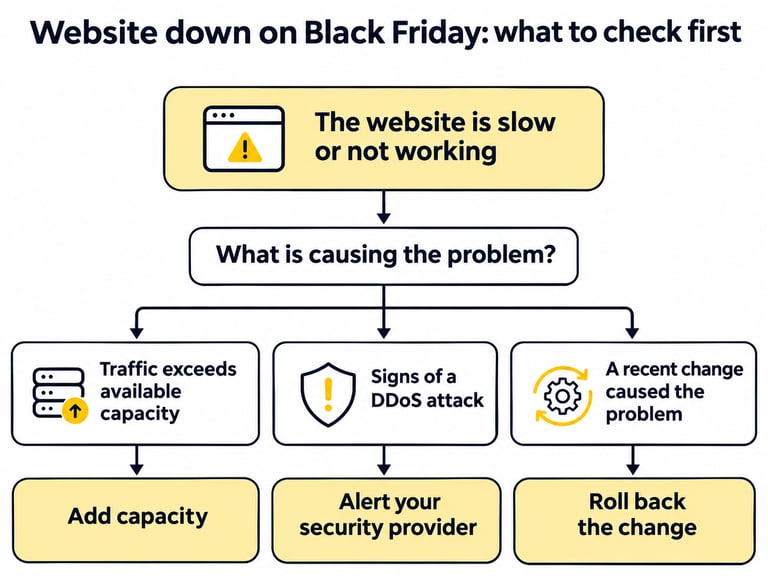
What should you do if your website crashes on Black Friday?
Follow the incident plan your team prepared before the sale. Set up external uptime monitoring and a checkout check in advance, with alerts routed to the people on duty. A homepage that still loads tells you little if the payment step has stopped working.
What is a code freeze before Black Friday?
A code freeze is a scheduled pause on routine changes to site code and settings, intended to keep the version your team has tested in place during the sale. Include application and plugin releases, hosting settings and changes to checkout in the freeze. Prices, banners and stock levels still need to change as the promotion runs, so agree who updates them and keep those edits within the workflows you have already tested.
Choose dates around your own sales calendar. One option is to start the freeze in early November once readiness checks are complete and end it after the January sales. Set an exception procedure for urgent security fixes or faults that interrupt orders. Name who approves an emergency change, decide what needs testing before release and agree how to reverse it if checkout gets worse. Record the change for whoever is on duty next.
Black Friday website timeline: October to the January sales
Plan the checks around each sales peak and keep the same incident contacts available through the Christmas and January trading periods.
| When | What to check |
|---|---|
| October | Confirm hosting limits and support arrangements. Run a load test against last year’s peak, fix the first bottleneck and retest before committing to the sale setup. |
| Early November | Complete mobile and desktop checkout tests, verify the backup payment route, activate attack and bot protection, and begin the code freeze once testing is complete. |
| Black Friday to Cyber Monday, 27 to 30 November | Black Friday is Friday, 27 November 2026, and Cyber Monday is Monday, 30 November. Monitor uptime, checkout errors and payment failures, with named staff on duty and an escalation route to your providers. |
| December | Keep protection active until after Christmas. Cloudflare’s “The Night Before Christmas” DDoS campaign began on Friday, 19 December 2025, with recorded peaks of 205 million requests per second and 24 Tbps during the campaign. |
| January sales, through mid-January | Review incidents and capacity during the next sales peak. After the sale, compare test results with what happened in production and lift the freeze once the team has reviewed queued changes. |
Black Friday preparation: next steps for your team
Confirm capacity, test checkout, activate security controls, rehearse recovery, assign the incident response roles and agree when to freeze routine changes. Then review the plan with your hosting and security provider before 27 November. Bring the results of your load and restore tests, along with the list of issues still open, so you can agree who will address each one before the sale. If you are assessing M247 Global’s managed security and recovery services, use that review to establish what support your store needs during peak trading.